Adding access points rarely fixes a coverage complaint when the cause is physical. On one pick floor, 12 APs went in over 18 months while racking changed the floor plan the original design assumed. Moving two APs ended the complaints. Survey what's already there before adding hardware.
Four sites, same root cause
Four sites. Same missing step.
Same pattern every time. Something was added to a site without anyone checking what was already there. Here is what went wrong, what fixed it, and what would have caught it first.
01
Distribution facility: the projector screen
A projector screen was ordered before anyone measured the ceiling void. Wrong part, wrong order, redo. Would have caught it: a tape measure, before the purchase order.
02
QSR site: the router outside its own cabinet
The router sat outside its own cabinet, and the site had zero designed Wi-Fi coverage. Fixed with a 24RU cabinet and two APs. Would have caught it: a coverage survey. Two APs in the right places did the job.
03
Pick floor: 12 APs in 18 months
Twelve access points went in over 18 months, chasing a coverage problem that was never a coverage problem. The racking had eaten the floor plan the original design was drawn against. Two APs moved, complaints gone. Would have caught it: a survey heatmap of the floor as it stands today. This is exactly what a
warehouse Wi-Fi audit is for.
04
Licensed club: no wireless design, ever
The venue had never had a wireless design. 61 APs went in against an actual zone plan, every AP mapped to a switch port, every port documented. Would have caught it: a survey first, with spectrum analysis on hand where the survey called for it. That is what an
enterprise Wi-Fi installation looks like when it starts from the site rather than the spec sheet.
The core question
Will adding more access points improve Wi-Fi?
Only when the problem is a genuine lack of coverage. When the cause is physical (racking, shelving, a fit-out change, a device in the wrong place), each new AP adds cost, another radio competing for the same channels, and one more thing nobody documented.
The pick floor is the proof. Twelve extra APs did not fix it. Moving two did. Warehouses change faster than their drawings, which is why a warehouse built for automation often has cabling that wasn't, and why limited connectivity in modern buildings is so often the building, not the AP.
Which check finds what
Walk-through, survey or spectrum analysis: which check finds what
The practical answer across the four sites:
Distribution facility
Walk-through and tape measure
Pick floor
Coverage survey (heatmap)
Licensed club
Survey, with spectrum analysis where required
Three of the four needed nothing more than a tape measure or a survey. Spectrum analysis is the escalation, used when the survey shows something coverage alone doesn't explain. Start with the cheapest check that can find the problem, and work up.
What it actually looks like
The cabinet nobody opened
This is what "the physical layer hiding underneath" actually looks like. Not a metaphor. None of it shows up on an audit that checks paperwork, because none of it is on the paperwork. A loose device with nothing tracking it is the same risk as the access point nobody documented. A cabinet packed and never opened is how a rack ends up running too hot to notice.
Most of what we find has been sitting there quietly for years. Nobody made the mess recently. Nobody opened the door.
IP65 enclosures fitted after the fact tell you the original install never planned for what was actually living in that mill. That gap between what the paperwork says and who is accountable for the cabinet is covered in who owns the risk in that cabinet.
Before the next purchase order
Check before you add: five questions
Run these before the next purchase order for an AP, a switch or a screen:
- When was the cabinet last opened, and by whom? If nobody knows, start there.
- Does the floor match the drawing? Racking, shelving and fit-outs move. Designs don't update themselves.
- Is every AP mapped to a port, and every port documented? If not, you can't tell what adding one more will do.
- Has anyone measured the space the new part has to fit? Ceiling voids, rack depth, mounting points.
- Has the complaint been measured, or only reported? A heatmap tells you whether it's coverage before you buy coverage.
If you can't answer three of the five, the next thing to buy is a survey, not hardware.
Common questions
Adding access points and site surveys, explained
Will adding more access points improve Wi-Fi?
Only if the problem is a genuine lack of coverage. When the cause is physical, such as racking, a changed floor plan or an access point in the wrong place, more access points add cost and interference without fixing it. On one pick floor, 12 APs went in over 18 months. Moving two ended the complaints.
What does a pre-install site survey check?
What is physically there before anything is added: ceiling voids and mounting points, where the existing network equipment sits, what the racking and fit-out look like today compared with the original drawings, and measured coverage across the space. It records the site as it is, not as the plans say it is.
Which problems does a basic walk-through catch, and which need spectrum analysis?
Across four sites, a tape measure caught one problem and a coverage survey caught two. Only the fourth, a 61 AP licensed club build, had spectrum analysis on hand, and it was used only where the survey called for it. Spectrum analysis is the escalation, not the starting point.
Why did the audit pass if the problem was there all along?
Most audits check what is on the list: registered devices, documented links, compliance paperwork. A router sitting outside its cabinet, racking that moved since the design, or a device sitting loose with nothing tracking it is not on the list, so it is never checked. Someone has to open the cabinet and walk the floor.
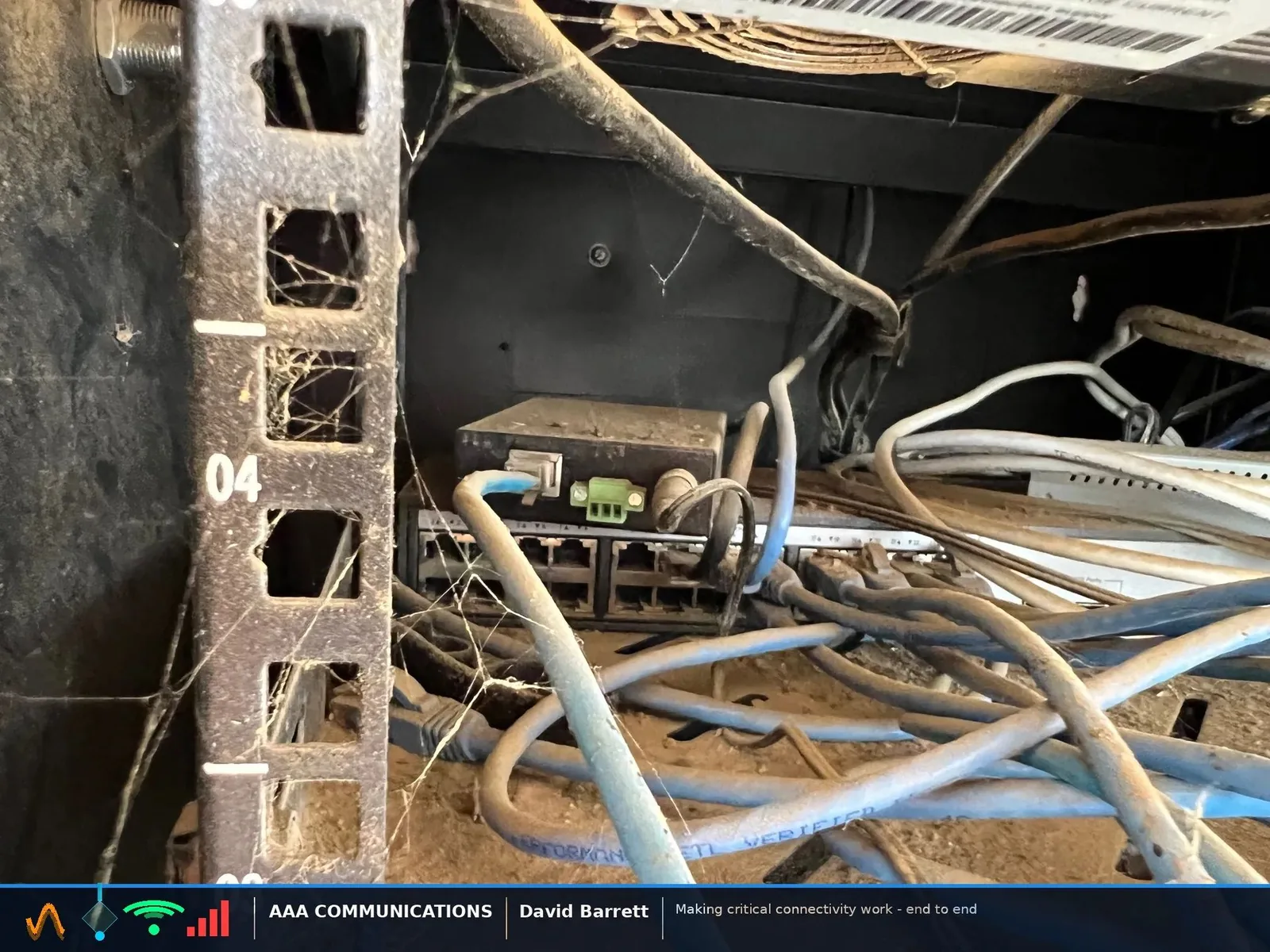
"Had a job back in the day to upgrade some switches at a feed mill and it seemed pretty straight forward on paper but once on-site I discovered dead mice and mouse sign in their network racks. The job turned into an epic saga of replacing chewed up network cables, putting the new runs through conduit, and installing IP65 enclosures at all switch locations. Nobody had a clue what lurked beneath until it was time to upgrade some switches."