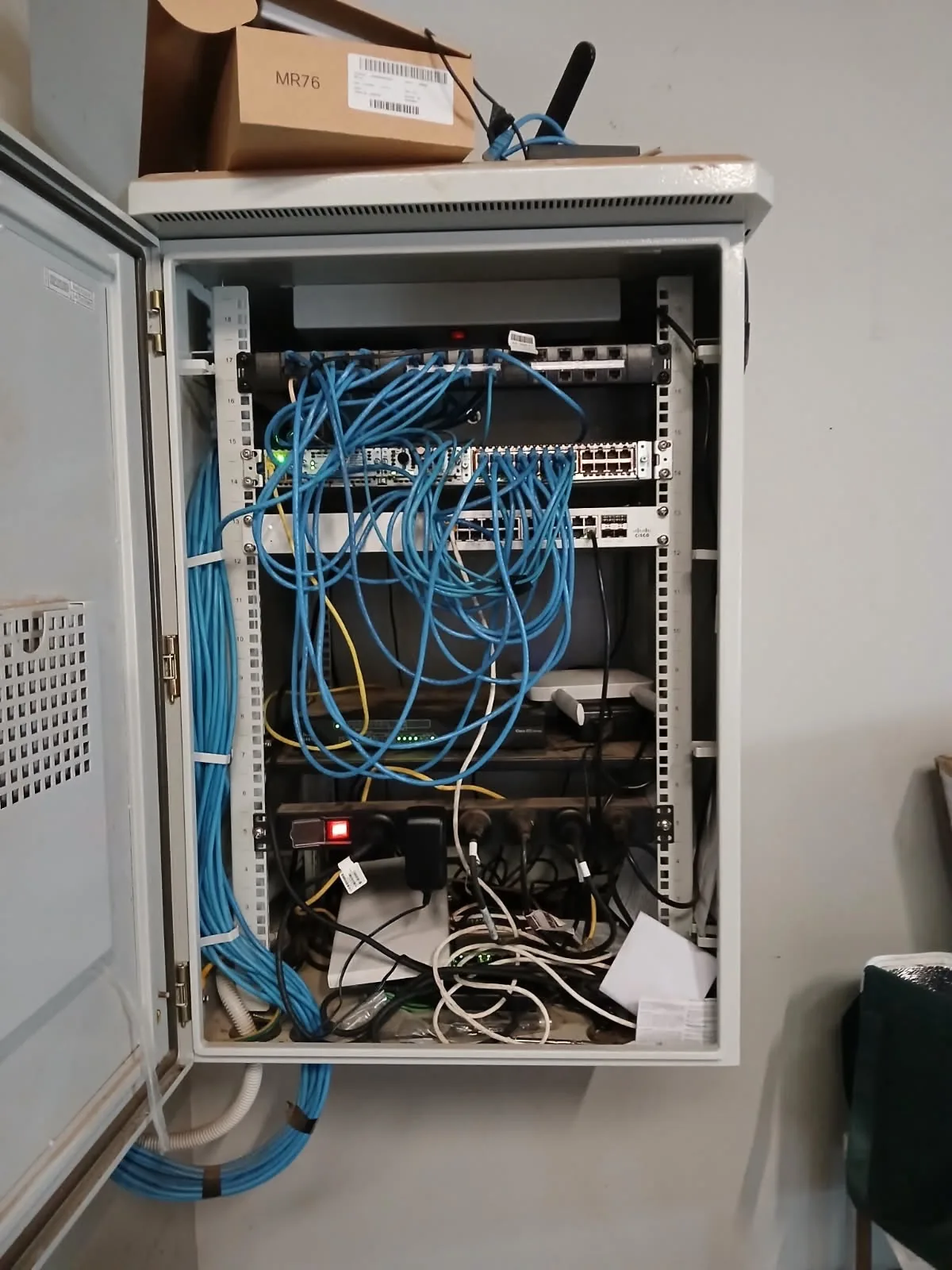
The cabinet as found. The access point on top was in nobody's design, and the state of the patching inside meant nothing out of place looked out of place.
Field Observation · Network Audit
It sat on top of a cabinet for a year, serving clients, visible to anyone who opened the door, and invisible to every diagram, asset register and change log in the business. This is how shadow IT actually happens.
The cabinet as found. The access point on top was in nobody's design, and the state of the patching inside meant nothing out of place looked out of place.
That access point on top of the rack wasn't in anyone's design. Someone needed better coverage in a hurry, grabbed a spare unit, ran a cable into whatever port was free, and moved on. It worked. Nobody documented it.
The situation
The access point is on the network. It's serving clients. And it doesn't appear on a single diagram, asset register or change log anywhere in the business.
This is how shadow IT actually happens. Not through malice, through convenience. A gap needed fixing today, and today always wins against paperwork.
The risk isn't that the device is old or unmanaged. The risk is that nobody responsible for security or performance knows it's a variable in the first place. You can't secure, patch or plan around a device that doesn't exist on paper.
Risk isn't old tech. It's undocumented, unvalidated infrastructure. A ten-year-old switch on the asset register is a known quantity. A one-year-old access point that isn't, is not.
When we shared this find, the response from network engineers, RF specialists and infrastructure managers around the world confirmed something we see on nearly every brownfield audit: everyone has found one of these. The more useful question is what you do about it, and how you catch the next one.
Detection
One of the sharpest observations from the thread: half the time you find out about a device like this quickly, because addresses from the wrong range start showing up in your allocation. A 192-space address appearing in a 10-space network is the giveaway.
Once you see addresses that don't fit the allocation plan, you know there's a device on the network that nobody signed off on. The question is whether anyone is watching for it, or just tripping over it after the fact.
That distinction matters. Discovery tools and IPAM hygiene will catch some of it, some of the time, if someone owns the job of looking. But logical discovery only tells you a device exists. It doesn't tell you where it is, what it's plugged into, whether the cabling behind it was ever certified, or what else in that cabinet shares the same undocumented status. That evidence only comes from a physical Layer 1 network audit that reconciles what's in the rack against what's on paper.
On brownfield sites the gap is usually wider than one device. Where cabling has been extended by multiple contractors across multiple projects without consistent records, the undocumented access point is a symptom rather than the finding, and brownfield cabling audit and remediation is what surfaces the rest. Where the device in question is an AP, the placement question matters as much as the register: an access point sitting inside a metal cabinet is a coverage problem regardless of whether anyone wrote it down, which is what a proper Wi-Fi audit and RF survey is for.
Convenience or compromise
An RF engineer who reviewed the photo raised the uncomfortable version of this story. He described a bank penetration tester whose method was simple: walk into a branch, plug a rogue access point into a spare LAN port on the switch, and leave. His partner would then log in from outside and begin the penetration test, checking whether the bank's security could detect and block the attack before it reached customer data. The bank hired him to do exactly that, and the findings protected them.
The lesson generalises well beyond banking.
A rogue AP looks identical whether it's convenience or compromise, until someone goes looking.
The access point in our photo was almost certainly innocent. Someone wanted coverage, and coverage appeared. But from the outside, an innocent convenience install and a deliberately planted attack device are indistinguishable. Both are unlabelled. Both are absent from the register. Both are quietly passing traffic. If your process can't tell them apart, you don't have a process, you have luck.
The same engineer also spotted a second access point inside the cabinet, positioned where closing the door would reduce its propagation to nearly nothing. Two APs, neither documented, neither in a position to deliver reasonable service. That's not a coverage design. It's an accumulation of quick fixes.
Prevention
A senior system engineer in aviation offered the most practical prevention advice in the thread, and it's worth repeating because it costs almost nothing to adopt.
Plan from the beginning and map it out. It doesn't have to be elaborate; rows in a spreadsheet, colour coded, is enough. Plan for the future where you can: two ports per desk, patch a minimum of one per desk, run everything neatly, and keep spare capacity so the next urgent request doesn't force an improvisation.
Then comes the part most people miss. If the rack is neat enough that someone outside IT can see the order in it, they're less inclined to touch it and more inclined to ask for help. A random odd cable in a neat rack is obvious at a glance. In a rack that's already a mess, it's camouflage.
A tidy rack polices itself. Anything out of place is obvious immediately. Messy racks hide problems, neat ones expose them. Cable management paired with change control turns the rack itself into a way of catching the next undocumented device.
Others who examined the photo catalogued what the mess was hiding:
The remediation sequence that works is the unglamorous one: install cable management, remove dead devices, rack-mount what you can, label everything, run short leads, lock the cabinet. And then the step most people skip because the visible problem is solved: put change control in place so there's a record of everything that happens to that cabinet from now on, and document the setup, both logical and physical. Cable management fixes the symptom. Change control stops the disease coming back.
From the thread
The photo drew network engineers, RF specialists and outside-plant veterans, all describing the same failure mode at different scales.
I know of a bank pen tester who used to leave a rogue AP connected to a LAN port during an "audit", then his partner would start the test from outside. Because of that, I always suspect a random AP plugged into the network at a cabinet.
Make it neat enough that someone not in IT sees it, and they're less inclined to touch it. A random odd cable in a neat rack is far more obvious than in a rack that's already a mess.
Magnify that to an entire company's outside-plant records. Entire cities where the permanent cable record is essentially a street map drawn in AutoCAD. No cables, no equipment. Then try to answer troubleshooting questions from that.
Scale
It would be comfortable to believe this is a small-site problem, one messy cabinet in one comms room. It isn't.
A veteran outside-plant engineer described entire towns where a carrier's permanent cable record was, in effect, a street map drawn in AutoCAD. No cables drawn. No equipment represented. Not drawn to a consistent scale. And that document was what employees, contractors and dial-before-you-dig locators were expected to troubleshoot from.
The failure mode was identical to our cabinet, just scaled up: individuals keeping the real records on personal machines that only they knew existed, projects built with inevitable field changes but no as-builts or redlines ever returned to the engineer who designed them. The fix that solves today's fault always beats the redline nobody is forcing anyone to file.
Whether it's one access point on a cabinet or an entire exchange area, the pattern is the same. Undocumented infrastructure isn't a tidiness problem. It's a risk surface that grows silently until the day it becomes an outage, a security incident, or a re-certification bill nobody budgeted for.
Our position
We have been validating physical infrastructure since 1992. If you're honest, you can probably picture your version of this access point right now. The device that predates everyone on the current team. The cabinet nobody opens. The switch that appeared during a project in 2019 and never made it onto a diagram.
A Layer 1 audit reconciles what physically exists against what's documented, tests what's carrying load against the standard it's expected to meet, and hands your team an infrastructure register built on evidence rather than assumption. Where the answer is cellular resilience rather than more copper, our in-building 4G and 5G coverage work covers it.
Physical validation of what's actually installed. Reconciliation against as-built documentation. Certification against current standards. A clear infrastructure register, so the next shadow device is found in a planned audit, not during an incident. One accountable partner, nationwide, on live business-critical networks.
Related reading
This article is one of several documenting the same root cause across different parts of the physical layer. If undocumented gear is a live concern in your estate, these cover the adjacent failure modes:
Common questions
Ready when you are
We work on live, business-critical networks nationwide. One accountable partner. No disruption. Full documentation.
Making critical connectivity work - end to end.
Half the time you find out about it quick, when 192-space IPs start showing up in your 10-space network.