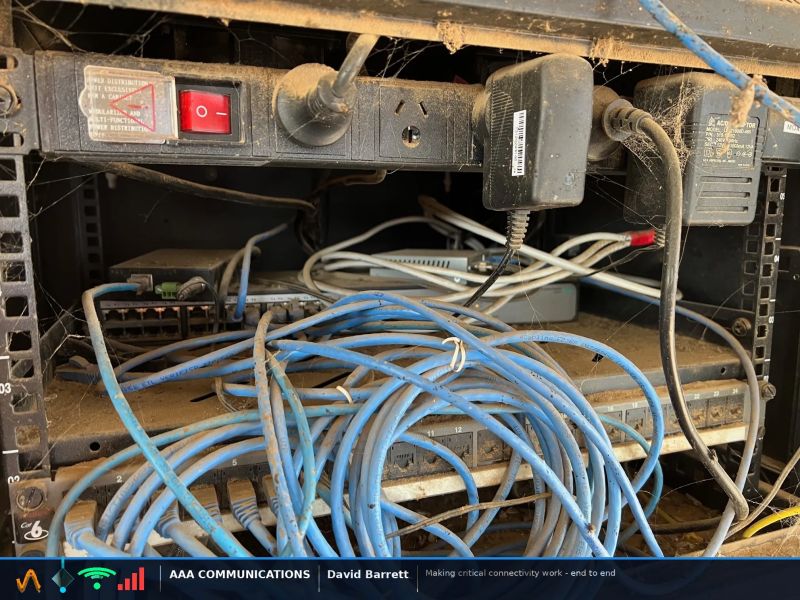
A cable bundle sitting across a switch's intake vents doesn't trip an alarm. It just pushes equipment temperature toward the edge of its safe range and holds it there, quietly, until the day something fails.
Cable congestion inside a rack is a thermal problem before it is a tidiness problem. When cabling blocks the airflow path switches and PDUs were designed around, equipment inlet temperature climbs toward the top of its safe operating range and stays there. ASHRAE guidance puts that range at 18 to 27 degrees, with only short excursions above it. A congested rack often sits at the edge of that range every day without ever triggering an alert, because throttling is not logged as a fault.
A switch that has been running above its rated temperature for years still answers a ping test. Blocked airflow doesn't trip an alarm. It shortens the equipment's working life quietly, until the day a fan or a power supply gives out and takes the switch down without warning.
What we found
AAA Communications has worked on Layer 1 physical infrastructure for enterprise and industrial networks in Australia since 1992. This article covers what cable congestion does to rack airflow, and why it so rarely surfaces as a logged fault.
The photograph above is a real cabinet. A coiled cable bundle sits pressed directly across the front of an unmanaged switch, blocking the path air needs to move across the intake. Above it, a power distribution unit and a run of plug-pack adapters carry a build-up of dust and cobwebs thick enough to suggest nobody has opened this cabinet in years.
A working ping test gets treated as proof the cabinet is fine. Airflow isn't part of that test. Nobody budgets time to physically inspect a cabinet that isn't complaining, so the first sign of a problem is usually the failure itself.
This pattern isn't rare. It's what most comms cabinets look like after several years of "quick" additions with no cable management discipline behind them.
Why it happens
Cable management is the first discipline that gets skipped under deadline pressure. A new device goes in, a patch lead gets run, and the old lead that's no longer needed gets coiled and pushed aside rather than removed. Multiply that by every project that has touched the rack, and the airflow path narrows a little more each time.
A cabinet gets touched by three different trades over five years. Each adds cabling for a new device or a relocated desk. None removes what's no longer in use, because tracing an old run back to its source takes longer than leaving it coiled at the bottom of the rack. Nobody re-checks the airflow path after the first install, because there's no fault to prompt it.
Five years on, the cabinet nobody has opened is running hotter than it was ever designed to, and nothing about its ping test says so.
Every device added without removing what it replaced adds another layer to the bundle sitting across the airflow path. The gap between a tidy install and the cabinet you'll actually find grows with every project that passes through.
"A congested rack doesn't fail. It throttles, recovers, and hides the cause."
The real cost
ASHRAE's recommended equipment inlet temperature range is 18 to 27 degrees, with only short excursions above it. A switch sitting at the top of that range, or past it, for months at a time doesn't fail on day one. It fails later, and by then nobody connects the failure back to a cable bundle that's been sitting across the intake since a project two years ago.
The Uptime Institute's 2025 data puts a number on what that failure actually costs: 57% of major outages now cost over $100,000, and one in five exceed a million. Heat-related component failure is exactly the kind of cause that gets discovered only after the outage, not before it.
What the thread confirmed
This photograph went up on LinkedIn and drew the same reaction from every corner of the industry. Nobody was surprised, and everybody had seen a version of it themselves.
Our position
A ping test tells you the network answered. It doesn't tell you what temperature it answered at, or how long the equipment behind it has left. The only way to know is to physically open the cabinet and check.
Physical inspection of the cabinet and its airflow path. Cable audit and re-dressing to clear intake and exhaust vents. Thermal spot-check against ASHRAE's recommended range. Documented findings, not an assumption based on a working ping test.
The question isn't whether a cabinet like this exists somewhere in your network. It's whether you find it during a planned assessment, or during the outage it eventually causes.
AAA Communications checks rack airflow and cable congestion as part of a full Layer 1 Network Audit.
Not ready for a full audit? Send us photos of your cabinet for a free Rate My Rack review: a technician's visual read on what's blocking the airflow.
Common questions