Boardroom AV cabling:
the 10-minute check that saves 2 to 3 weeks.
The builder's electricians ran Cat6 to the wall and Cat6 to the table. The scope of work also called for HDMI, USB and control cables. None went in, and the floor conduit was too small to add them.
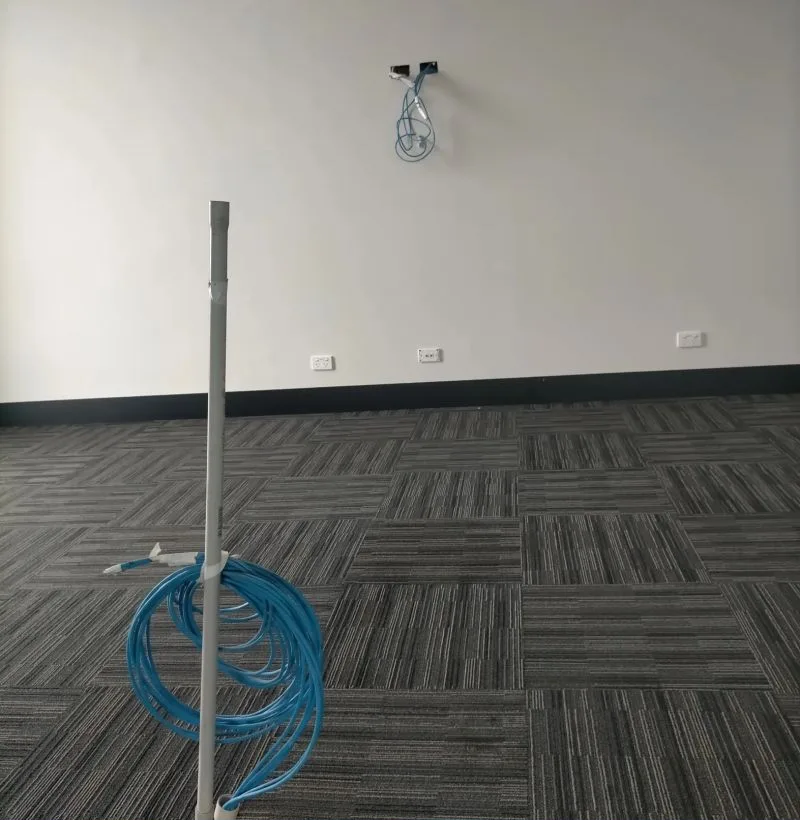
The boardroom as we found it. Cat6 coiled at the base of the cable draw pole, and Cat6 left at the wall where the screen and VC unit mount. No HDMI, USB or control cable anywhere.
A boardroom or video conferencing room needs every A/V cable in the electrician's scope before the walls and floor close: data (Cat6), HDMI, USB (including any proprietary USB the VC system requires) and control, running between the display, the VC unit and the table, in conduit big enough for all of them. On a recent job three of those cable types were missed, and the fix took 2 to 3 weeks.
What happened
Two cables went in. The room needed five types.
The client was fitting out a boardroom for video conferencing. The work was split across several vendors, and the builder's electricians ran the data cabling.
They ran exactly two things: Cat6 to the wall where the TV and VC unit mount, and Cat6 up through the floor conduit to the meeting table.
The scope of work also called for HDMI, USB and control cables between the TV, the VC unit and the table. None of them went in. And the conduit through the floor was too small to pull them through after the fact.
The room could not go live. The fix was a full redo of the table run.
| Step | Why it takes time |
|---|---|
| Plan the rework | New conduit route, cable schedule and access to a finished floor |
| Approvals | Client, builder and building management sign-off for a floor chase |
| Book technicians | Specialist crew availability around a working office |
| Pull out the existing cable | The undersized conduit has to come out with it |
| Chase the floor, fit 32mm conduit | Sized for the full cable set this job needed |
| Re-run every cable to spec | Cat6, HDMI, USB and control, per the original SOW |
| Test and document | Every run tested, as-builts updated |
| Total | 2 to 3 weeks, for a room that would have been finished on day one |
We are often the crew that gets called in to clean this up. We would rather be the first one in.
The obvious question
Why not just use extenders over the Cat6?
Seven practitioners asked us this on LinkedIn, and it is a fair question. HDMI and USB extenders over Cat6 can work well, and on plenty of rooms they are the right design.
They were not an option here, for two reasons:
The real lesson is about timing. Extenders, native cable or a wireless table system can each be the right answer, but only if someone picks one before a single cable gets pulled.
The checklist
8 checks before the walls close.
Run these on every boardroom, meeting room or VC room fitout. Most take minutes. Missing any one of them can cost weeks.
| # | Check | When |
|---|---|---|
| 1 | The full cable list is in the electrician's scope | At quote, before sign-off |
| 2 | The equipment list is locked | Before any cable is pulled |
| 3 | Native cable or extenders: decided and written down | Before any cable is pulled |
| 4 | Conduit sized for every cable, plus spare | Before first fix |
| 5 | Screen backing behind the plasterboard | Before the boards go up |
| 6 | One drawing set, current revision confirmed | At kickoff |
| 7 | A 10-minute walk-through with whoever pulls the cable | Before first fix |
| 8 | The quote shows two costs | At quote |
"Ten minutes on site with the A/V cable list and conduit sizes in hand. It's the cheapest meeting on the whole project."
Price it honestly
Cost A and Cost B.
Todd C., a low voltage system designer and estimator, put it best in the thread: always show the cost two ways.
Putting both on the quote makes the cheaper-looking option show its real price before anyone signs. Five minutes on the SOW beats a floor chase later.
What the thread confirmed
27 practitioners. One answer: lock the list before the cable.
The LinkedIn post on this job had 13,321 impressions, reached 9,788 people and drew 62 comments from AV integrators, cabling engineers, IT directors and project managers. Seven of them, in their own words.
Our position
Get the scope checked before anyone pulls cable.
AAA Communications is a Sydney-based network cabling and Wi-Fi specialist that has worked on live networks since 1992. We test, fix and document cabling for Office, Branch, Retail and Industrial sites, delivered nationally.
On at least 4 in 10 jobs we are called into, we find installation gaps or deficiencies that need rework of some kind. Most of them are visible on paper weeks before they are visible on site. If you have an A/V or cabling quote in front of you, send it for a free scope review. We check every cable, the conduit sizes and what is missing against the equipment list, and email plain findings. Target turnaround: 2 business days.
Who on your next fitout is checking the cable list before the boards go up?
Common questions
Boardroom AV cabling, explained.
What cabling does a video conferencing room need?
What size conduit does a boardroom floor box need?
Can HDMI and USB extenders over Cat6 replace native cables?
Is wireless screen sharing an option instead of cabling the table?
When should the A/V cable list be checked?
What does it cost if boardroom AV cabling is missed?
Related insights