Cat6A cable failing its test?
Trace the whole run.
Our A$495 Find the Fault is a triage and report in Sydney: up to 1 hour on site, then a written report with photos and a quote for remediation within 48 hours of the visit.
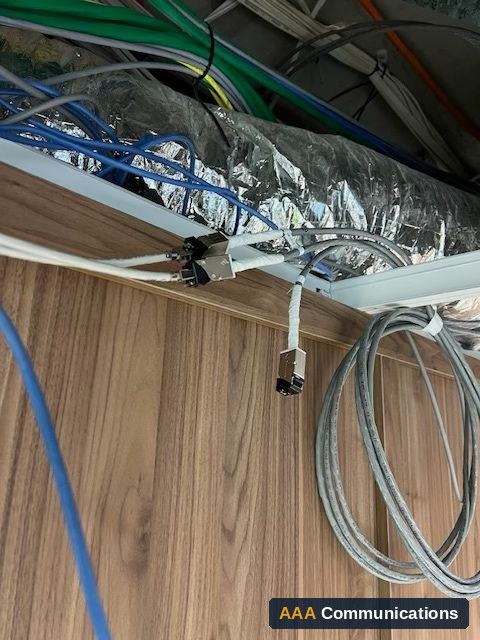
At an existing Macquarie Park office, two Cat6A cables to the reception desk were failing. Each had a join in the ceiling, Cat6A on one side and Cat6 on the other, linked at a coupler.
Not ready to book? Send 3 photos of the rack to Rate My Rack. It is free, and you get an answer in 1 business day.
By David Barrett, Managing Director, AAA Communications. Updated 12 November 2026.
The question
Why would a Cat6A cable fail its cable test?
There is more than one cause, and the fault is not always at either end. Risk is not old cable. Risk is cabling nobody has traced, documented or tested along its whole path.
On one job, two Cat6A cables to the same desk were failing. The cause sat in the ceiling, where neither end of the run could show it.
One job
What happened at the Macquarie Park office?
We were brought into an existing installation, not our own, for testing and remediation. Two Cat6A cables to the reception desk were failing.
We traced each one from the patch panel to the wall port. In the ceiling we found a join on both: Cat6A on one side, Cat6 on the other, linked at a coupler.
We would have replaced both cables outright. We could not get access from the desk into the plenum space, so we had no choice but to work with the cabling as found. We tested each section, remediated on a fixed quote, and both cables passed their cable tests.
We ran a little over time, so while we were there we helped mount a monitor. The customer was pleased with the result.
Replacement is the clean fix. Where access rules it out, you test the whole path and work with what is there.
The risk
Where can a fault hide in a cable run?
- A join or coupler in a ceiling, riser or pathway.
- A different cable category on one side of the join than the other.
- Poor terminations at the patch panel or the wall port.
- Damage in pathways from later work by other trades.
- Runs that are unlabelled or missing from the as-builts.
Each one is quick to find on a site visit and slow to sort out while staff are waiting on a desk that does not work.
The checks
How do you find a hidden join?
Physical layer only. Seven steps:
- Confirm which runs fail, using the panel and wall port labels.
- Test each failing run and keep the result.
- Trace the whole path from the patch panel to the wall port, through every pathway you can reach.
- Look at every point where the cable is joined or coupled. Note the category on each side.
- Once you know where the join is, test each section on its own.
- Decide: replace the run if you can get access. If you cannot, work with the cabling as found and say so in writing.
- Retest the whole path, then record the results and photos in the as-builts.
For what we check and fix inside a cabinet, see our cabinet scope. For cabling a previous tenant left behind, see inherited cabling after a tenant move. For the questions to ask before you sign off an install, see the install sign-off checklist.
From the thread
What engineers added in the LinkedIn thread
The post drew comments from engineers who have chased joins of their own. Two points worth keeping, with thanks to each.
Bradley Hayes (Biomedical Engineering, aspiring network engineer) traced cabling into the ceiling of a hospital area while it was closed. Multiple contractors had worked in the area afterwards, so anyone could have touched the cabling. The certified results supplied to IT at handover were what showed what had been installed. He also questioned solid core cabling where pendants get moved around. A flexible lead from a fixed outlet keeps that movement off the permanent link.
James Hayes described a join in a concrete ceiling. They knew it was there but could not see it. A purple cable on top and an orange one underneath was the clue. Different jacket colours on each side of a join are worth noticing, and it only helps if someone is tracing the whole path.
The offer
What does Find the Fault include and cost?
- A$495 ex GST in Sydney.
- A triage and report, on site within 48 hours.
- Up to 1 hour on site.
- Written report with photos, and a quote for remediation, within 48 hours of the visit.
- If you go ahead with the quoted work, the A$495 is credited.
Some faults are intermittent or sit outside cabling, such as Wi-Fi or electrical. We do not promise to find the cause on the first visit. You get a clear report either way, with the next steps.
What we need from you: site access, which runs are failing, and any test results or drawings you have. Since 1992, 34 years on live networks. 1,000+ sites taken over and taken live. ACRS-registered cablers. 5.0 from 20 Google reviews. One accountable partner from the first walk-through to go-live.
Common questions